本文最后更新于212 天前,如有错误请发送邮件到2176284372@qq.com
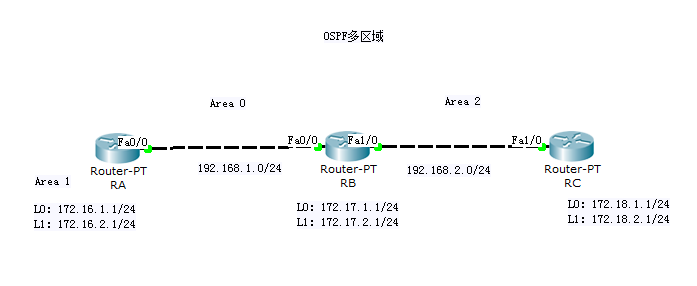
以下是详细的配置步骤:
网络拓扑总结:
- RA (Area 0): f0/0(192.35.1.1) ↔ RB f0/0(192.35.1.2) (Area 0)
- RB (Area 0 和 Area 2): f0/1(192.35.2.1) ↔ RC f0/1(192.35.2.2) (Area 2)
OSPF配置:
RA 配置:
RA(config)# router ospf 1
RA(config-router)# router-id 1.1.1.1
RA(config-router)# network 172.16.1.1 0.0.0.0 area 1
RA(config-router)# network 172.16.2.1 0.0.0.0 area 1
RA(config-router)# network 192.35.1.1 0.0.0.0 area 0
RB 配置:
RB(config)# router ospf 1
RB(config-router)# router-id 2.2.2.2
RB(config-router)# network 172.17.1.1 0.0.0.0 area 1
RB(config-router)# network 172.17.2.1 0.0.0.0 area 1
RB(config-router)# network 192.35.1.2 0.0.0.0 area 0
RB(config-router)# network 192.35.2.1 0.0.0.0 area 2
RC 配置:
RC(config)# router ospf 1
RC(config-router)# router-id 3.3.3.3
RC(config-router)# network 172.18.1.1 0.0.0.0 area 2
RC(config-router)# network 172.18.2.1 0.0.0.0 area 2
RC(config-router)# network 192.35.2.2 0.0.0.0 area 2
完整配置示例:
RA:
en
conf t

h RA

interface Loopback0
 ip address 172.16.1.1 255.255.255.255

interface Loopback1
 ip address 172.16.2.1 255.255.255.255

interface FastEthernet0/0
 ip address 192.35.1.1 255.255.255.0
 no shutdown

router ospf 1
 router-id 1.1.1.1
 network 172.16.1.1 0.0.0.0 area 1
 network 172.16.2.1 0.0.0.0 area 1
 network 192.35.1.1 0.0.0.0 area 0
RB:
en
conf  t

h RB

interface Loopback0
 ip address 172.17.1.1 255.255.255.255

interface Loopback1
 ip address 172.17.2.1 255.255.255.255

interface FastEthernet0/0
 ip address 192.35.1.2 255.255.255.0
 no shutdown

interface FastEthernet0/1
 ip address 192.35.2.1 255.255.255.0
 no shutdown

router ospf 1
 router-id 2.2.2.2
 network 172.17.1.1 0.0.0.0 area 1
 network 172.17.2.1 0.0.0.0 area 1
 network 192.35.1.2 0.0.0.0 area 0
 network 192.35.2.1 0.0.0.0 area 2
RC:
en
conf  t

h RC

interface Loopback0
 ip address 172.18.1.1 255.255.255.255

interface Loopback1
 ip address 172.18.2.1 255.255.255.255

interface FastEthernet0/1
 ip address 192.35.2.2 255.255.255.0
 no shutdown

router ospf 1
 router-id 3.3.3.3
 network 172.18.1.1 0.0.0.0 area 2
 network 172.18.2.1 0.0.0.0 area 2
 network 192.35.2.2 0.0.0.0 area 2
验证命令:
# 在每台路由器上执行:
show ip ospf neighbor      # 查看OSPF邻居状态
show ip route              # 查看路由表
show ip ospf interface     # 查看OSPF接口信息
show ip ospf database      # 查看OSPF数据库

# 在RB上执行(作为ABR):
show ip ospf border-routers  # 查看ABR信息
注意事项:
- RB是ABR(区域边界路由器),连接Area 0和Area 2
- 所有Loopback接口都配置为/32掩码,这是最佳实践
- Area 0是骨干区域,所有其他区域必须直接连接到Area 0
- 使用
network命令时,0.0.0.0通配符掩码表示精确匹配该IP地址
配置完成后,所有路由器应该能互相学习到所有网络的路由信息。