本文最后更新于200 天前,如有错误请发送邮件到2176284372@qq.com
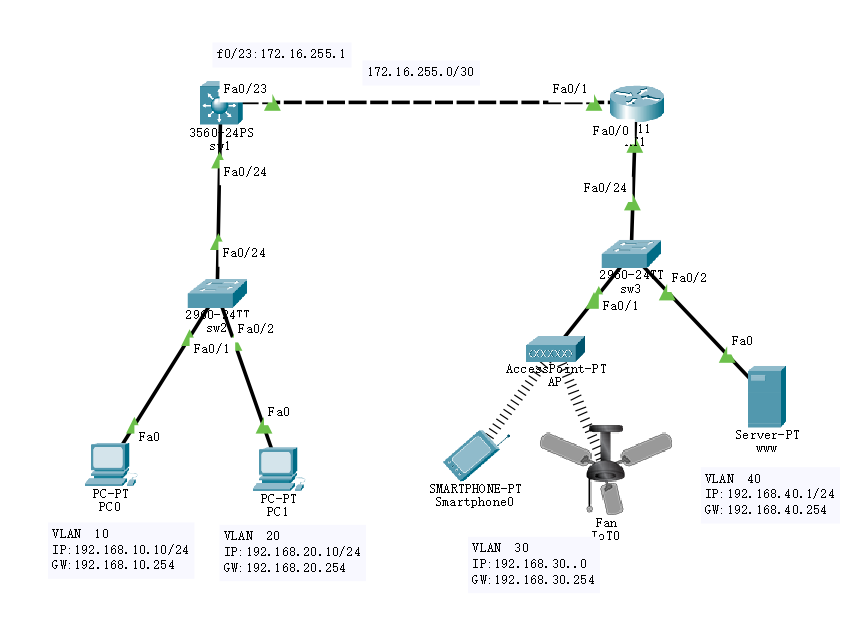
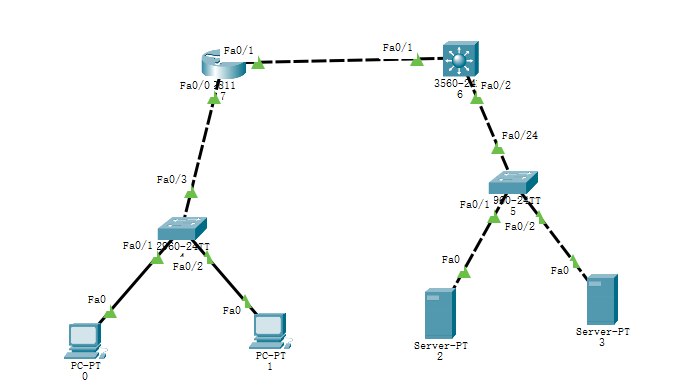
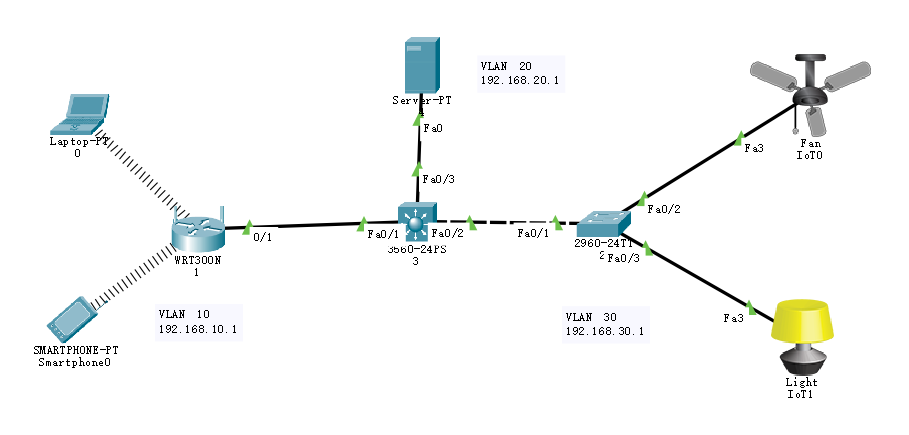
这是一个典型的企业网络拓扑,结合了三层交换机(左侧)和路由器(右侧/核心),并划分了多个VLAN。为了实现DHCP自动分配IP以及全网互通(互相Ping通),我们需要配置VLAN间路由、OSPF或静态路由以及DHCP服务。
以下是针对图中各个关键设备的详细配置代码。
1. 三层交换机 (MSW1 / 3560-24PS) 配置
这台设备负责左侧 VLAN 10 和 VLAN 20 的网关,同时充当 DHCP 服务器,并负责与右侧路由器的连接。
Switch> enable
Switch# configure terminal
Switch(config)# hostname MSW1

! 开启IP路由功能(关键步骤,否则无法进行VLAN间路由)
MSW1(config)# ip routing

! 创建VLAN
MSW1(config)# vlan 10
MSW1(config-vlan)# name DATA_PC0
MSW1(config)# vlan 20
MSW1(config-vlan)# name DATA_PC1
MSW1(config)# exit

! 配置SVI(虚拟接口)作为网关
MSW1(config)# interface vlan 10
MSW1(config-if)# ip address 192.168.10.254 255.255.255.0
MSW1(config-if)# no shutdown
MSW1(config)# interface vlan 20
MSW1(config-if)# ip address 192.168.20.254 255.255.255.0
MSW1(config-if)# no shutdown
MSW1(config)# exit

! 配置连接下方二层交换机的端口 (Trunk)
MSW1(config)# interface f0/24
MSW1(config-if)# switchport trunk encapsulation dot1q
MSW1(config-if)# switchport mode trunk
MSW1(config-if)# exit

! 配置连接右侧路由器的端口 (路由端口)
MSW1(config)# interface f0/23
MSW1(config-if)# no switchport
MSW1(config-if)# ip address 172.16.255.1 255.255.255.252
MSW1(config-if)# no shutdown
MSW1(config)# exit

! 配置DHCP地址池 (VLAN 10 和 20)
MSW1(config)# ip dhcp pool POOL_VLAN10
MSW1(config-dhcp)# network 192.168.10.0 255.255.255.0
MSW1(config-dhcp)# default-router 192.168.10.254
MSW1(config-dhcp)# dns-server 8.8.8.8

MSW1(config)# ip dhcp pool POOL_VLAN20
MSW1(config-dhcp)# network 192.168.20.0 255.255.255.0
MSW1(config-dhcp)# default-router 192.168.20.254
MSW1(config-dhcp)# dns-server 8.8.8.8
MSW1(config)# exit

! 配置默认路由指向右侧路由器 (实现去往右侧网络的路径)
MSW1(config)# ip route 0.0.0.0 0.0.0.0 172.16.255.2
2. 左侧二层交换机 (sw2 / 2960-24TT) 配置
这台交换机只需要透传VLAN信息。
Switch> enable
Switch# configure terminal
Switch(config)# hostname SW2

! 创建VLAN
Switch(config)# vlan 10
Switch(config)# vlan 20

! 配置上行端口 (连接MSW1)
Switch(config)# interface f0/24
Switch(config-if)# switchport mode trunk

! 配置接入端口 (连接PC)
! 假设 PC0 接 f0/1, PC1 接 f0/2
Switch(config)# interface f0/1
Switch(config-if)# switchport mode access
Switch(config-if)# switchport access vlan 10

Switch(config)# interface f0/2
Switch(config-if)# switchport mode access
Switch(config-if)# switchport access vlan 20
3. 路由器 (Router / R1) 配置
这台设备负责右侧 VLAN 30 和 40 的网关(单臂路由),并提供右侧的DHCP服务。
Router> enable
Router# configure terminal
Router(config)# hostname R1

! 配置连接左侧交换机的接口
Router(config)# interface f0/1
Router(config-if)# ip address 172.16.255.2 255.255.255.252
Router(config-if)# no shutdown
Router(config)# exit

! 配置右侧单臂路由 (子接口)
Router(config)# interface f0/0
Router(config-if)# no shutdown
Router(config-if)# exit

! VLAN 30 网关 (无线设备)
Router(config)# interface f0/0.30
Router(config-subif)# encapsulation dot1Q 30
Router(config-subif)# ip address 192.168.30.254 255.255.255.0
Router(config-subif)# exit

! VLAN 40 网关 (服务器)
Router(config)# interface f0/0.40
Router(config-subif)# encapsulation dot1Q 40
Router(config-subif)# ip address 192.168.40.254 255.255.255.0
Router(config-subif)# exit

! 配置DHCP地址池 (VLAN 30 和 40)
Router(config)# ip dhcp pool POOL_VLAN30
Router(config-dhcp)# network 192.168.30.0 255.255.255.0
Router(config-dhcp)# default-router 192.168.30.254

Router(config)# ip dhcp pool POOL_VLAN40
Router(config-dhcp)# network 192.168.40.0 255.255.255.0
Router(config-dhcp)# default-router 192.168.40.254
Router(config)# exit

! 配置静态路由回指左侧网络 (关键步骤:告诉路由器怎么去 192.168.10.x 和 20.x)
ip routing
Router(config)# ip route 192.168.10.0 255.255.255.0 172.16.255.1
Router(config)# ip route 192.168.20.0 255.255.255.0 172.16.255.1
4. 右侧二层交换机 (sw3 / 2960-24TT) 配置
连接AP和服务器,需要配置Trunk连接路由器。
Switch> enable
Switch# configure terminal
Switch(config)# hostname SW3

! 创建VLAN
Switch(config)# vlan 30
Switch(config)# vlan 40

! 配置上行端口 (连接Router, 必须是Trunk以支持单臂路由)
Switch(config)# interface f0/24
Switch(config-if)# switchport mode trunk

! 配置AP端口 (假设接在 f0/1)
Switch(config)# interface f0/1
Switch(config-if)# switchport mode access
Switch(config-if)# switchport access vlan 30

! 配置服务器端口 (假设接在 f0/2)
Switch(config)# interface f0/2
Switch(config-if)# switchport mode access
Switch(config-if)# switchport access vlan 40
5. 终端设备设置说明
- PC0 和 PC1:
- 点击 PC -> Desktop -> IP Configuration。
- 选择 DHCP。它们应该能分别获取到 192.168.10.x 和 20.x 的地址。
- Smartphone (智能手机):
- 需要确保 Access Point (AP) 已开启且手机通过无线连接到了AP(在Config中设置SSID一致,默认是Default)。
- IP Configuration 选择 DHCP。它应该获取到 192.168.30.x 的地址。
- Server (服务器):
- 建议设置静态IP(虽然配置了DHCP,但服务器通常用静态)。
- IP: 192.168.40.1, Subnet: 255.255.255.0, Gateway: 192.168.40.254。
为什么这样能通?
-
VLAN间路由:MSW1处理左边的VLAN互通,Router处理右边的VLAN互通。
-
路由表:
-
MSW1 通过默认路由 (
ip route 0.0.0.0 ...) 把不认识的流量扔给 Router。 -
Router 通过静态路由 (
ip route 192.168.10.0 ...) 知道去往左边的包要扔给 MSW1。 -
物理连接:中间的虚线链路配置为三层路由端口(No switchport),IP地址在同一网段(172.16.255.0/30),保证了左右两大块网络的连通性。